
Nuclear Design Bureau · Game Guides · Guide
Nuclear Design Bureau Tips — Builds, Simulation Habits and Early Access Caveats
Nuclear Design Bureau tips: save designs through the design files box, measure in the criticality lab, keep layers thin, and read patch notes before building.
By the New Game Wiki team · Updated 2026-10-04
On this page (8)
- Design and Build Tips
- Simulation Habits That Save Time
- Caveats, Bugs and What Is Coming
- What is the first habit I should build in Nuclear Design Bureau?
- Should I start in the campaign or in sandbox mode?
- How do I avoid wasting material on a bad design?
- Is there a rule for how thick the casing should be?
- Why does an old design suddenly stop working?
The Nuclear Design Bureau tips that actually help are the ones that survive a physics patch, and in an Early Access sim where the developer explicitly says the physics, tools and campaign change based on what players do, that is a short list. The habits below come from the official description, the patch notes and two long-running Steam threads, and they are framed as process rather than magic numbers — because the numbers here move.
Design and Build Tips
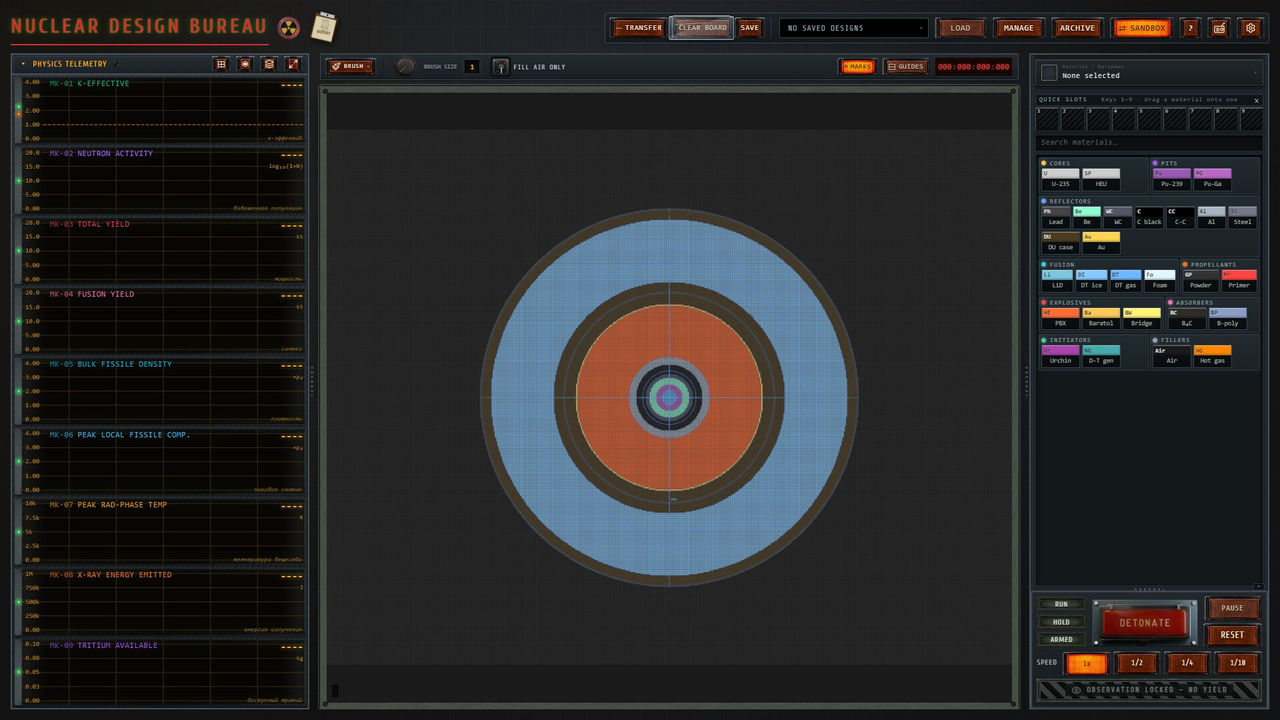
Start with your workflow, because losing designs is the most common self-inflicted problem in this game. The design save path is a box at the bottom of the materials menu under the header design files, and saved designs load from a drop-down at the top of the screen, so a design you do not save is a design you will rebuild by hand.
| Habit | Why it matters |
|---|---|
| Save through the design files box | Designs are not preserved between sessions by default |
| Learn in sandbox mode | Unlimited experimentation with full design freedom |
| Read the directive before building | Some directives carry material limits that invalidate a layout |
| Lay out layered ellipses | Reported to beat box layouts for two-stage devices |
| Keep casing layers thin | Reported to stop the casing blocking what the first stage delivers |
- Put the primary to one side of the device with space around it rather than at the centre.
- Give the second stage its own thick-walled casing and fill it generously with fusion fuel.
- Keep tertiary rings sub-critical until the shockwave arrives, or they activate early.
- Expect a build that works today to need re-testing after a physics patch.
Simulation Habits That Save Time
The simulation is the expensive part, both in machine time and in your time, so habits that reduce wasted runs pay off quickly. The developer notes that the current build is compute-heavy, and player reviews report that the simulator is slow and that large designs strain weaker hardware.
| Habit | Documented reason |
|---|---|
| Test small first | Large designs run slowly at minimum specification |
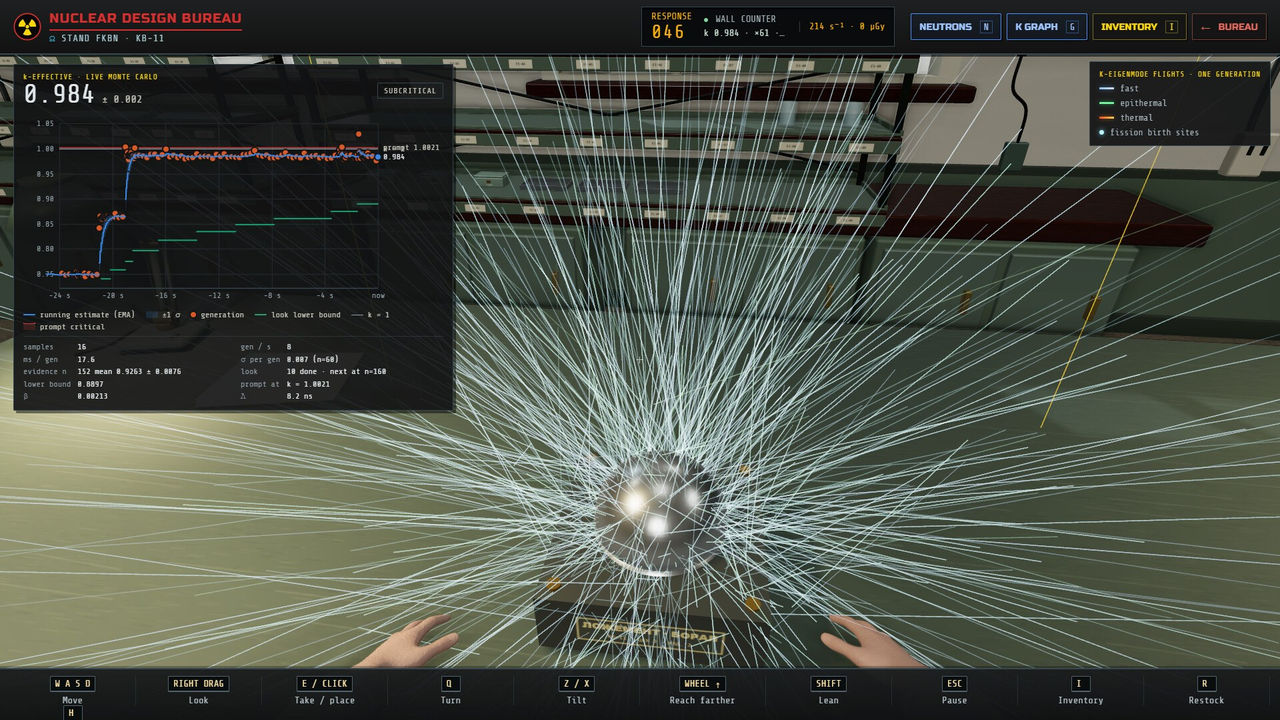
| Use the criticality lab before the red button | Live k-effective gives you a trend before you commit |
| Watch the operator, not just the counter | Exposure shows on the character and the wall counter lags |
| Diagnose fizzles instead of rebuilding blind | Refining is a named phase of the loop |
| Re-run after each change | A patch fixed simulation speed affecting yields, so runs are now more comparable |
- One patch fixed devices with more than eight fissile clusters fizzling, so older cluster-count advice may no longer apply.
- A later hotfix sped up burn on the second stage and large designs generally.
- Fusion yield now displays the percentage of fusion fuel burned, which is a better diagnostic than raw output alone.
- A physics patch added a warning for extremely large fissile masses attempting to be simulated, so heed it rather than pushing through.
Caveats, Bugs and What Is Coming
The honest caveats matter as much as the tips. The store page carries an explicit Early Access warning about bugs, freezes and crashes, states that Linux, Proton and macOS are not officially supported yet, and discloses that AI-assisted images, text and code were used during development with all content reviewed and edited by the developer. Player reviews report editor annoyances such as undo and redo hanging under heavy use, selections breaking after using the fill tool, and useful metrics being missing from the materials panel.
- Save before ambitious edits, because undo and redo have been reported to hang or crash under heavy use.
- Do not rely on the editor to show you criticality while placing materials; use the lab for that measurement.
- Keep an eye on the announcements feed, since hotfixes have addressed crash cases, yield bugs and campaign progression blockers.
- The roadmap promises a public leaderboard and per-directive efficiency statistics, so comparing designs is planned rather than present.
Accessibility is quietly good, which helps here: the store lists Mouse Only Option, Playable without Timed Input, Custom Volume Controls and Save Anytime, so the game can be played at a deliberate pace with a mouse alone. For the loop those tips serve, see the guide page; for the compression mechanics behind a failed design, see the implosion page.
FAQ
What is the first habit I should build in Nuclear Design Bureau?
Save your designs. A community answer on the Steam discussions says there is a save box at the bottom of the materials menu under the header design files, and that you load them from a drop-down at the top of the screen. Players who assumed designs persisted automatically reported losing sandbox work between sessions.
Should I start in the campaign or in sandbox mode?
Sandbox mode allows unlimited experimentation with full design freedom, while campaign directives add technical goals and material limits on some jobs. If you are still learning the physics, sandbox removes the constraint while you test; once a layout works, the directive becomes a puzzle about doing it inside the limits.
How do I avoid wasting material on a bad design?
Measure before you commit. The criticality lab is a first-person room where you place the core in its cradle, lower the beryllium reflector and watch a live Monte Carlo k-effective estimate climb toward one on a lagging wall counter, with exposure showing on the operator rather than in a readout.
Is there a rule for how thick the casing should be?
Not an official one. Players in the Steam design thread report keeping layers below roughly 20 units so the casing does not block x-rays and neutrons, and note that thin layers get vaporised and lose density quickly. Treat that as a reported starting point and verify it on your own build.
Why does an old design suddenly stop working?
Because the physics changes. An official physics patch made fissile material resist compression more and warned that yields would change, fixed neutron leakage out of LiD and DU, and fixed hot gas not expanding properly. Any design tuned before a physics patch needs re-testing rather than assuming user error.
More in Game Guides
More game guides pages in Nuclear Design Bureau.
- Nuclear Design Bureau Guide — Directives, Design, Simulation and DetonationGuideUpdated 2026-10-04
References
- Nuclear Design Bureau on Steam
- Yields and multi-stage designs — Steam discussion
- How to save a design in sandbox? — Steam discussion
- Nuclear Design Bureau — Steam Community Hub news and patch notes
Facts on this page are compiled from the references above. Items marked "to confirm" are single-source and not yet verified.