
Nuclear Design Bureau · Devices · Guide
Nuclear Design Bureau Implosion — Compression, Casing and Criticality
Nuclear Design Bureau implosion designs explained: how compression and criticality are modelled, reported casing findings, and how to test before a detonation.
By the New Game Wiki team · Updated 2026-10-04
On this page (8)
- How the Game Models Implosion
- Layering and Casing Findings from Players
- Checking a Compression Design Before You Detonate
- What does implosion mean in Nuclear Design Bureau?
- How do I know if my implosion is close to critical?
- How thick should the casing be?
- Why does my second stage fail to ignite?
- Does the game model x-rays and neutron transport?
Nuclear Design Bureau implosion, in game terms, is the compression step: you drive material inward so a sub-critical assembly becomes denser, hotter and finally self-sustaining. The official description is unusually specific about the physics underneath, naming hydrodynamics, neutron transport and thermonuclear fusion, and the store page promises real-time modelling of shockwaves, heat, radiation and chain-reaction behaviour. The practical problem is the same one the criticality lab exists to solve: knowing how close you are before you commit to a layout.
How the Game Models Implosion
The simulation is not a stat check, which is why the developer keeps patching it. It runs detonation physics in real time from the red button, and the roadmap says the detonation viewer is being refined with better shockwaves, damage radius and thermal radiation modelling, destructible buildings and targets, and finer grid resolution for stronger GPUs. That means the fidelity of your compression result is tied to both your design and the current build.
| Modelled element | Documented detail |
|---|---|
| Shockwaves | Simulated in real time during detonation |
| Heat | Included in the real-time physics model |
| Radiation | Modelled, and displayed on the operator in the criticality lab |
| Chain reaction | Explicitly named in the core feature list |
| Neutron transport | Named in the store pitch and touched by a physics patch |
| Criticality estimate | Live Monte Carlo k-effective in the criticality lab |
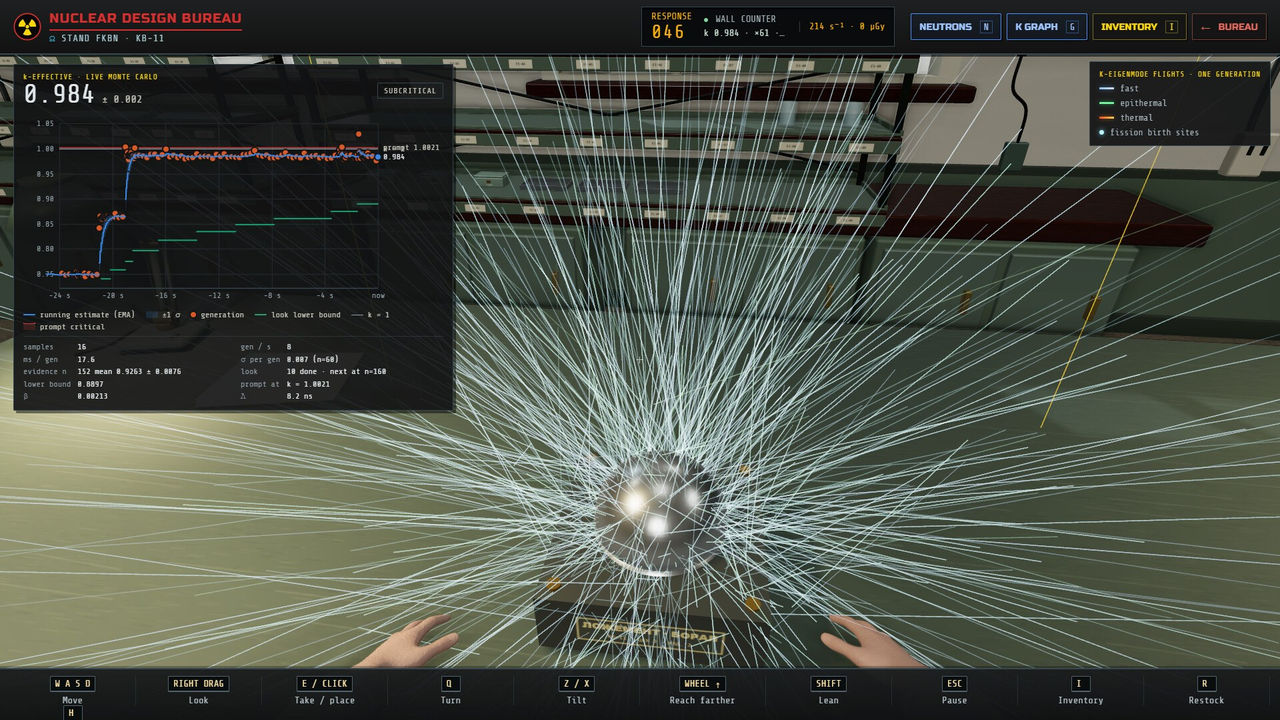
- Approach criticality in the lab rather than by intuition, because the k-effective estimate gives you a trend while the wall counter lags.
- Watch the operator, not just the instruments, since exposure accumulates on the character.
- Expect the numbers to move: one physics patch changed how fissile material resists compression and warned that yields would change.
- Keep early devices small, because large designs are compute-heavy and run slowly at minimum specification.
Layering and Casing Findings from Players
The developer publishes the loop and the physics, but not a build recipe, so the practical layering advice comes from player threads and should be treated as reported rather than authoritative. The most detailed thread describes a three-stage device, and the numbers in it come with the usual Early Access caveat.
| Player finding | Reported detail |
|---|---|
| Overall shape | Lay the device out as an ellipse within an ellipse; a long potato-shaped outer ellipse with an egg-shaped second stage inside |
| Primary placement | Put the primary to one side with space around it rather than centred |
| Second stage | Fill the largest ellipse you can with D-T ice and give it its own thick casing |
| Casing thickness | Keep layers below roughly 20 units so x-rays and neutrons are not blocked |
| Tertiary | Use a large LiD sphere with concentric rings for neutron generation, and keep those rings sub-critical |
| Neutron activity | A reported peak around 10^28 in the third stage, with anything above roughly 10^26 enough for the reaction to be tritium-positive |
- Foam and an outermost duralumin-uranium shell with gold lining recur in the reported working designs.
- Keeping tertiary rings sub-critical until the shockwave arrives is described as the key to stopping them activating early.
- Asymmetry is the most common cause of failure: players report the second stage generating the implosion through x-ray heating, so a lopsided first stage ruins it.
- A reported bug once made a particular fissile material unusable, and the thread's advice was to substitute another; check the patch notes for the current state rather than trusting the workaround.
Checking a Compression Design Before You Detonate
The workflow that the game itself recommends is measure, design, simulate, refine, and the measuring step is the one that saves the most rebuilds. Use the criticality lab first, then simulate, then diagnose. A physics patch also fixed several failure modes that used to look like design errors: hot gas not expanding, single particles slowing or stopping designs, a simulation refusing to restart after one broken run, and fusion yield not showing the percentage of fuel burned.
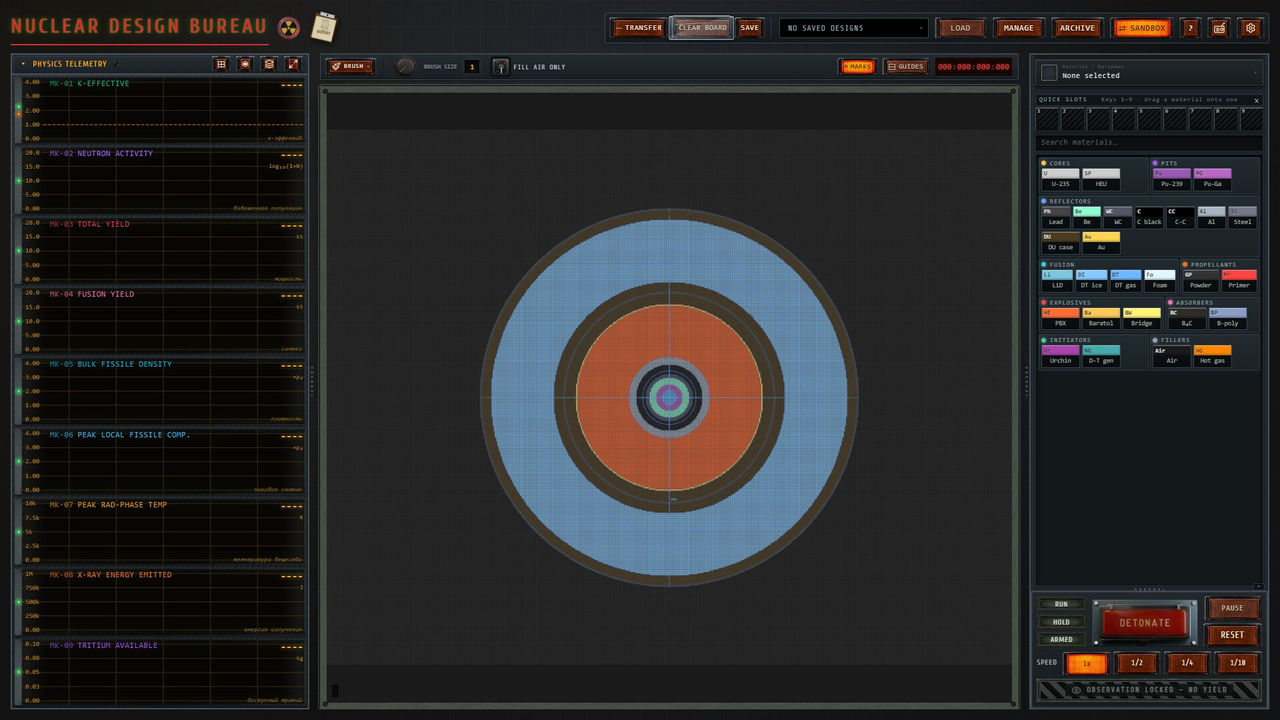
Two habits keep this loop productive. First, save your designs as you iterate, because the game keeps them in a design files box rather than preserving every experiment automatically. Second, read each patch note before trusting an old design, since compression resistance, neutron leakage and burn speed have all been changed at least once. For the whole loop in order, see the guide page; for the specific directive that asks for a first implosion device, see the rds-1 page.
FAQ
What does implosion mean in Nuclear Design Bureau?
In this game it is the compression step: material is driven inward so an assembly that was sub-critical becomes denser and hotter until the chain reaction takes off. The official description frames the whole simulation around real-time shockwaves, heat, radiation and chain-reaction behaviour rather than abstracted numbers.
How do I know if my implosion is close to critical?
Use the criticality lab. You set the core in its cradle, lower the beryllium reflector onto it and watch a wall counter while a live Monte Carlo k-effective estimate climbs toward one, with the counter lagging the way the real instrument would and exposure showing on the operator.
How thick should the casing be?
There is no developer-published figure. A player in the Steam design thread reports keeping duralumin-uranium layers below roughly 20 units so the casing does not block x-rays and neutrons from the first stage, and notes that thin layers get vaporised and lose density quickly. Treat that number as to confirm and test it on your own build.
Why does my second stage fail to ignite?
The most reported cause is a first stage that destroys the fusion material or reaches it asymmetrically. Players recommend laying the device out as an ellipse within an ellipse, placing the primary off to one side with space around it, and giving the second stage its own egg-shaped casing so the implosion arrives evenly.
Does the game model x-rays and neutron transport?
Yes. The store description says the game simulates hydrodynamics, neutron transport and thermonuclear fusion, and a physics patch specifically fixed neutron leaking out of LiD and DU too fast, improved hot-gas expansion, and made fusion yield display the percentage of fusion fuel burned.
More in Devices
More devices pages in Nuclear Design Bureau.
- Nuclear Design Bureau RDS-1 — The Directive Device and How to Build ItGuideUpdated 2026-10-04
References
- Nuclear Design Bureau on Steam
- Yields and multi-stage designs — Steam discussion
- Nuclear Design Bureau — Steam Community Hub news and patch notes
- Nuclear Design Bureau — SteamDB app record
Facts on this page are compiled from the references above. Items marked "to confirm" are single-source and not yet verified.