
DustFall · Mechanics · Guide
DustFall Tips — Terrain, Scan and Upgrade Habits That Matter
DustFall tips from the store page: read each layer's terrain before digging, never farm the shallow layers, and pick the upgrade branch the ruin needs.
By the New Game Wiki team · Updated 2026-10-14
On this page (10)
- Read the Terrain Before You Commit
- Never Farm the Shallow Layers
- Choose the Upgrade Branch the Layer Asks For
- Break Supports on Purpose
- Habits to Drop Early
- What is the most important DustFall tip for a new player?
- Should I clear every enemy in DustFall?
- When should I switch payloads in DustFall?
- Is it safe to break supports in DustFall?
- Does DustFall have difficulty options for a slow player?
DustFall tips are mostly about tempo, because the game's central system is a clock. The surface scan begins to close in at the start of every descent, staying too close to the upper layers gets you detected, and detection draws increasingly dangerous hunters down from above. Every habit below follows from that one design, and none of it depends on numbers the store page never published.
The practical version is simple: go down, read the material in front of you before you commit, and treat every act of destruction as having a cost as well as a payoff.
Read the Terrain Before You Commit
What to do: before you start shooting, identify which terrain reactions the layer is offering. The store page names three explicitly, and each one implies a plan rather than a reflex.
- Ignite oil, and let fire spread through the terrain as area denial.
- Detonate powder caches to blast a route through solid rock.
- Remove crucial supports to bring a collapse down on enemies.
Why it matters: the store page states that each of the six layers has its own terrain materials and environmental reactions, so a reaction that carried you through one ruin may not exist in the next. Committing to a route before you know the material is how a good build turns into a stuck one.
When to do it: in the first moments of a descent, and again whenever you enter material you have not seen in that layer. The terrain page breaks down each reaction individually.
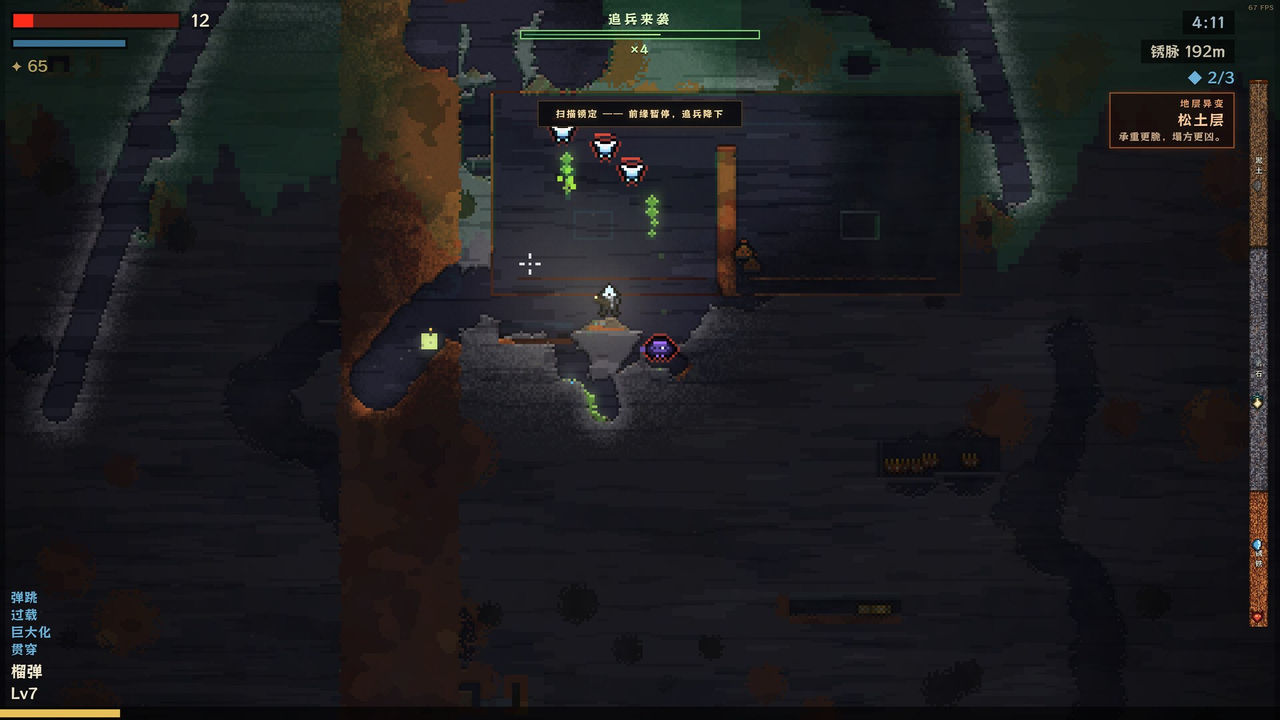
Never Farm the Shallow Layers
What to do: do not clear and re-clear the area near the top of a descent, and do not treat a cleared shallow zone as a base.
Why it matters: the store page is explicit that staying too close to the upper layers gets you detected, and that detection draws increasingly dangerous hunters. Because the wording escalates, a long stall is worse than a short one, and the safety you get from digging beyond the scan's reach is described as brief.
When to do it: from the first descent. The shallow layer is a place you pass through, and the hunters page explains exactly why backtracking is punished.
Choose the Upgrade Branch the Layer Asks For
What to do: at each three-way upgrade, ask which branch the ruin in front of you needs. Enhance your weapon if the payload already suits the material, take a passive ability if you want a slow-burn payoff, or switch payloads if the current tool is wrong for the terrain.
Why it matters: the store page describes freely combinable payloads and upgrades, which means the build is steerable and the branches are not a one-time class pick. Because the layers differ in materials and reactions, flexibility is worth more than depth on a single payload.
When to do it: every time the choice appears, and especially at the start of a new layer. The payloads page covers the three branches in detail.
Break Supports on Purpose
What to do: treat support removal as a deliberate trap you set, not as scenery you happen to destroy while digging.
Why it matters: the store page says removing crucial supports brings a collapse down on your enemies, and in the next sentence warns that every act of destruction may open a path to survival, or bring an entire ruin down on top of you. The collapse does not care which side of it you are standing on.
When to do it: when enemies are committed below the structure you are about to drop, and never while you are underneath it yourself.
Habits to Drop Early
- Digging straight down through supporting rock without checking what is above you.
- Fighting every enemy instead of reaching the layer's core.
- Staying in a cleared shallow area to pick up leftover loot.
- Locking into one payload before seeing what the new layer is built from.
- Setting fire to oil you are standing near, because fire spreads through the terrain.
Each of those habits comes from a rule the store page states directly, and each one is faster to unlearn than a run is to replay. For the order to do things in, the walkthrough page and the beginner guide put these tips into a run structure.
FAQ
What is the most important DustFall tip for a new player?
Keep moving down. The store page says staying too close to the upper layers gets you detected and draws increasingly dangerous hunters, and that digging beyond the scan's reach earns a brief moment of safety. Depth is both progress and protection.
Should I clear every enemy in DustFall?
No. The only documented goal is reaching the bottom of a layer and defeating its core so you can fall into the next ruin. Fighting everything near the surface costs time that the scan is using against you.
When should I switch payloads in DustFall?
When the layer's terrain does not suit your current tool. The store page says each of the six layers has its own terrain materials and environmental reactions, and the three-way upgrades include a switch payloads branch for exactly that reason.
Is it safe to break supports in DustFall?
Only when you have planned the collapse. The store page says removing crucial supports brings a collapse down on your enemies, but it also warns that every act of destruction may bring an entire ruin down on top of you, so the same action cuts both ways.
Does DustFall have difficulty options for a slow player?
The store API lists Adjustable Difficulty, Playable without Timed Input and Playable at your own pace, which are the documented options for softening the pace. The store page does not explain how they interact with the surface scan.
More in Mechanics
More mechanics pages in DustFall.
- DustFall Cataclysm Mode — The Post-Ending Mode on SteamGuideUpdated 2026-10-14
- DustFall Controls — Keyboard and Mouse on WindowsGuideUpdated 2026-10-14
- DustFall Features — Destructible Terrain, Payloads and Six RuinsGuideUpdated 2026-10-14
- DustFall Gameplay — The Descent Loop, Payloads and the Surface ScanGuideUpdated 2026-10-14
References
Facts on this page are compiled from the references above. Items marked "to confirm" are single-source and not yet verified.