
TOEM 2 · Walkthrough · Guide
TOEM 2 Demo — What It Includes and What Changed
The TOEM 2 demo covers the opening tutorial town, jumping and climbing, and the camera's new tool attachments. Here is what the demo includes and what changed.
By the New Game Wiki team · Updated 2026-10-04
On this page (8)
- What the TOEM 2 Demo Includes
- What Changed From the First TOEM
- Demo Progress and the Full Game
- What does the TOEM 2 demo include?
- Does the TOEM 2 demo carry progress into the full game?
- Is the TOEM 2 demo still available?
- What is new in the TOEM 2 demo compared with the first game?
- Is the demo grayscale like the full game?
The TOEM 2 demo is a short pre-release slice that teaches the game's new movement and camera tools in a small town before release. A press preview from June 2026 describes it as a quick tutorial followed by a handful of clue-based fetch quests, and it is the clearest look at how the sequel changed from the first TOEM. It is not the full game: the demo covers one town and a few tools, not the four regions of the shipped release.
What the TOEM 2 Demo Includes
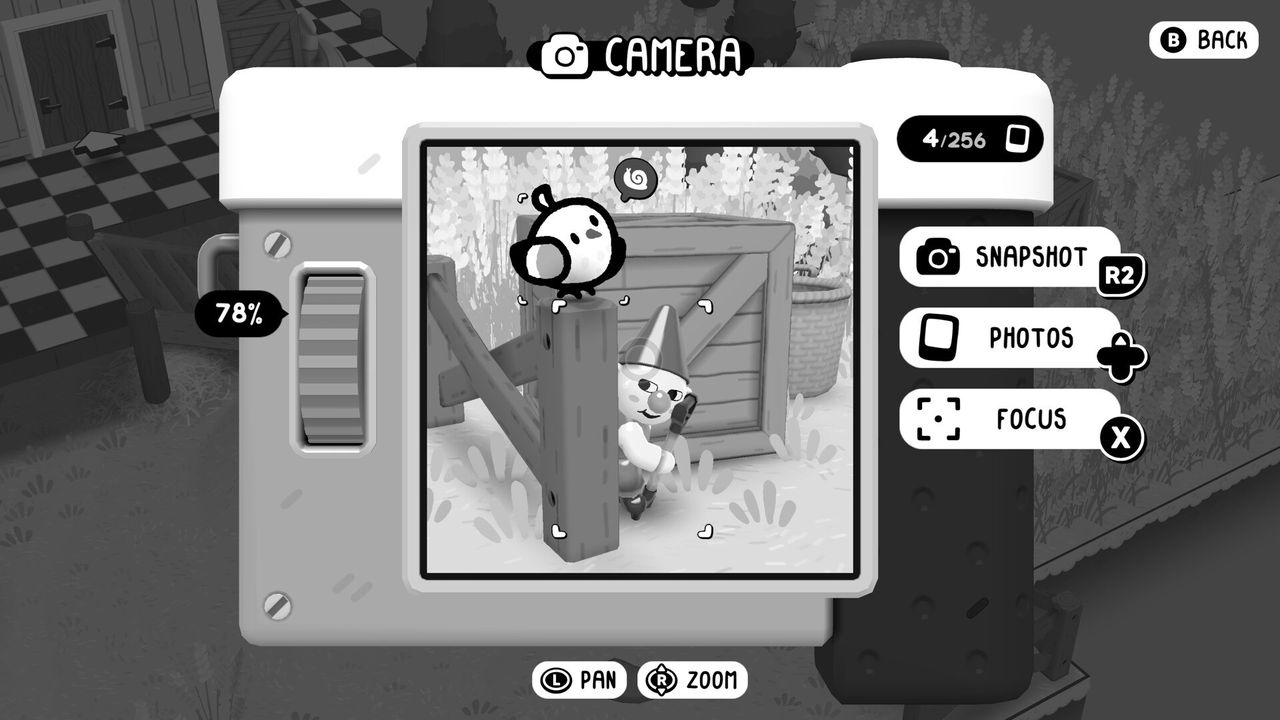
The preview walks through the demo's structure directly. It opens with a quick tutorial, then drops you into a town where a stressed plumber needs help with a clogged pipe. The camera is used both for photos and as a multitool, and the demo hands you a screwdriver to fix the pipe. Quests follow the series pattern: you pick up clues, some heavy-handed and some more opaque, and photograph the item, character or creature they point to.
| Demo element | What the preview reports |
|---|---|
| Opening | A quick tutorial that kicks off the demo |
| Movement | Jumping and climbing, new abilities for the series |
| Camera | Photos plus a multitool with other instruments attached |
| First quest giver | A friendly but stressed plumber with a clogged pipe |
| Tool shown | A screwdriver, used on the pipe |
| Photo storage | A scrapbook that doubles as an inventory for turning in quests |
The preview also notes the demo's tone: photographs of a curious fish, a lone bicycle and an abandoned can of tuna become meaningful because of the people you meet, which is the series trick of making the mundane feel magical.
What Changed From the First TOEM
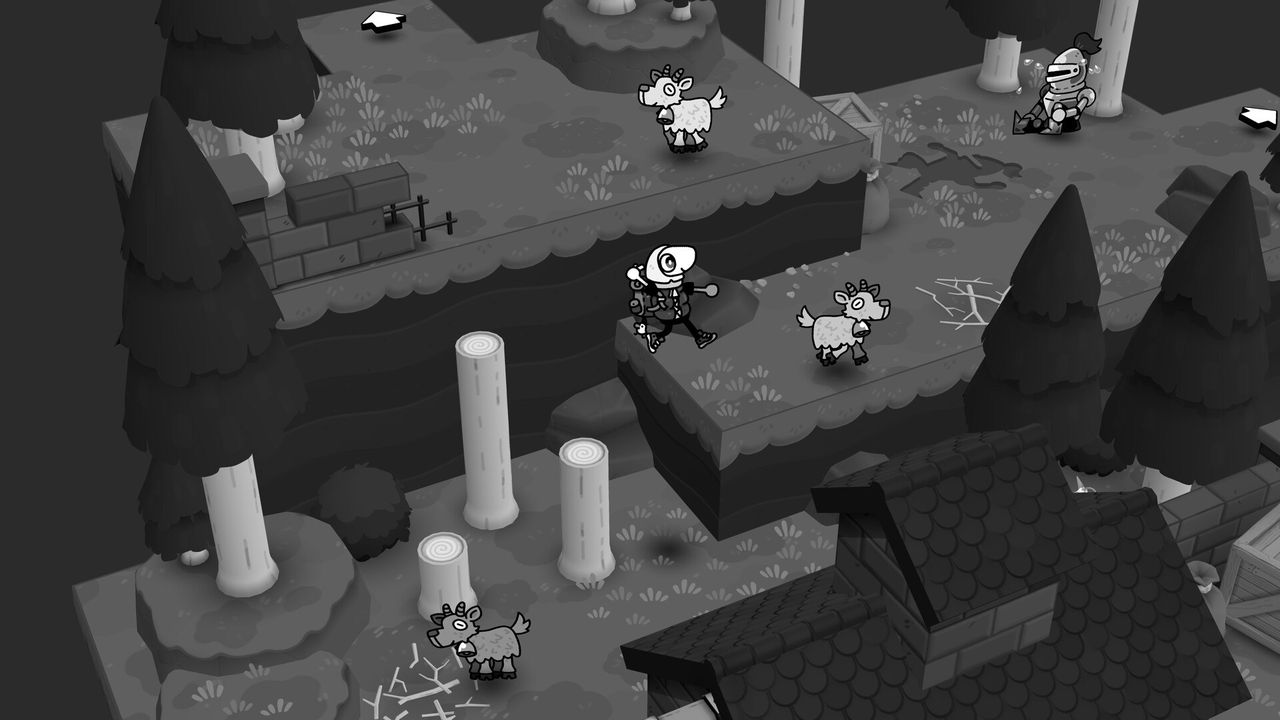
Two changes are visible from the first minutes. The world itself is now smooth and beautifully 3D-modelled without the stark edges of the original, while the characters and many items keep the familiar illustrated cartoon look, so the cast pops against the new environments. The second change is mobility: the character can jump and climb, which turns the town from a backdrop into a traversable space.
- Environments are smooth and 3D-modelled rather than flat-edged, per the preview.
- Characters and critters keep the illustrated cartoon style of the first game.
- Jumping and climbing are new, and the preview calls the movement smooth and satisfying.
- The camera is a multitool, so puzzle solutions are not limited to photography.
- Photos land in a scrapbook that works as a quest inventory.
Community full-game footage adds one small continuity detail: the bus stop character Kioski is described as just a box in the demo and properly modelled in the release, which is a single-source observation, to confirm.
Demo Progress and the Full Game
Nothing in the official material explains what happens to demo progress, so treat the demo as a self-contained showcase until a source says otherwise. The full release is structured differently anyway: it runs across four regions with a stamp-gated bus between them, and the demo's single town maps most closely to the opening flow rather than to a whole region.
| Feature | Demo | Full release |
|---|---|---|
| Playable area | One tutorial town | Four regions plus Whirlhill |
| Movement | Jump and climb, per the preview | Same movement, spread across all regions |
| Camera tools | Camera plus at least a screwdriver | Adds scissors and a hammer per region |
| Quest scope | A few clue-based fetch quests | Roughly 20 stamps per region, gated by bus |
| Save transfer | Not documented yet | Not documented yet |
The practical reads from that comparison:
- The demo is a showcase, not a shortened campaign.
- Movement and camera tools carry over conceptually, since the full game uses the same systems.
- The full game's structure comes from the bus and the stamp gate, which the demo does not use.
- Nothing official confirms a save import, so plan to restart if you buy the full game.
If you want the release structure before playing, the regions page covers the four areas, the walkthrough covers quest flow and stamp gating, and the release date page covers when the full game arrived and on which platforms.
FAQ
What does the TOEM 2 demo include?
A press preview from June 2026 describes a short tutorial town that teaches the new movement and camera tools, followed by a small town with fetch quests built from photo clues. The demo hands you the camera and at least one other tool, a screwdriver, and its photos feed a scrapbook that doubles as an inventory.
Does the TOEM 2 demo carry progress into the full game?
Not documented yet. Neither the official site nor the Steam page states whether demo saves transfer, and no source describes an import feature. The safe assumption is that the demo is a standalone slice, but treat any transfer claim as unverified until an official source confirms it.
Is the TOEM 2 demo still available?
Not documented yet. The demo was previewed by press in June 2026 and appears in community footage under names like full demo and demo walkthrough, but the current Steam listing for TOEM 2 does not document a downloadable demo. Check the official site and store page before assuming it is still live.
What is new in the TOEM 2 demo compared with the first game?
Two big changes show up immediately. The world is now smooth and fully 3D-modelled instead of flat-edged, while the characters keep their illustrated cartoon look, and the character can jump and climb instead of only walking. The camera also becomes a multitool with extra instruments.
Is the demo grayscale like the full game?
Yes. The preview is titled Grayscale never looked so vibrant and describes a monochrome world where the look remains the series signature. The change is the rendering of the environments, which are smooth and 3D-modelled rather than starkly flat, not the colour palette.
More in Walkthrough
More walkthrough pages in TOEM 2.
- TOEM 2 How Long to Beat — Main Story and 100% TimesQ&AUpdated 2026-10-04
- TOEM 2 Regions — Homelanda, Cropten, Taletorp and DeltburgGuideUpdated 2026-10-04
- TOEM 2 Walkthrough — Every Region, Stamp and QuestGuideUpdated 2026-10-04
References
- TOEM 2 Demo Preview
- TOEM 2 — Official Site
- TOEM 2 on Steam
- TOEM 2 Full Gameplay | The Most Adorable Photo Adventure — YouTube
Facts on this page are compiled from the references above. Items marked "to confirm" are single-source and not yet verified.