
Hex Reverse · Mechanics · Guide
Hex Reverse Gameplay — Core Loop, Flip Rule, SP Skills and Pacing
Hex Reverse gameplay is a turn-based duel on 19 hexes: compare six edge values, flip enemy cards to your side and rebuild your deck after every fight you win.
By the New Game Wiki team · Updated 2026-10-08
On this page (10)
- The Core Loop: Win a Battle, Take a Card, Fight Again
- How the Flip Rule Actually Decides a Fight
- SP, Skills and Element Changes
- What a Lost Run Costs
- Difficulty and Pacing
- What is the core loop of Hex Reverse?
- How does the flip mechanic work in Hex Reverse?
- What does SP do in Hex Reverse?
- What happens when a run ends in Hex Reverse?
- Is Hex Reverse real-time or turn-based?
Hex Reverse gameplay is turn-based territory control wrapped in a roguelike run. The short version: you place a card on a 19-space hexagonal field, the values on its touching edges are compared against your opponent's cards, and anything you outnumber flips to your side. Between battles you take cards out of your opponent's deck and put them into your own, and between runs you convert those results into permanent upgrades at your base.
The Core Loop: Win a Battle, Take a Card, Fight Again
The repeatable unit of Hex Reverse is a run, and a run is a series of battles rather than one long match. Each battle plays out on the same type of board: a field of 19 hexagonal spaces where you and your opponent take turns placing cards. Winning gives you a reward that is unusually direct for a deckbuilder, because the store description says you choose one card from a selection taken from your opponent's deck, and that card is added straight into your current run deck and can be used in the battles ahead.
| Loop stage | What you do | What you get | What it is spent on |
|---|---|---|---|
| Battle | Place cards on the 19-space hex field | Flips and territory | Board control in that fight |
| Reward | Pick one card from the enemy deck | A new card in the run deck | The next battles of the run |
| Run end | Finish or lose the expedition | Run results | Base phase |
| Base | Build decks, trade cards, fuse, upgrade gear | Permanent progression | Harder Rifts |
Every choice in that table changes the shape of your deck, which the store page calls out explicitly as the reason runs keep feeling different.
How the Flip Rule Actually Decides a Fight
Cards are defined by their six values, one per side, and the comparison only ever looks at the edge that touches an enemy card. If your value is higher, the opposing card flips to your side; if it is not, nothing happens. That single rule is why positioning matters more than raw card power: the same card can flip a neighbour on one side and lose its opposite edge to a card placed a turn later.

The practical consequence is that you are always choosing which of your six values gets tested, and against what. The Steam description frames this as reading the board and using each card's strengths to take control of as much territory as possible, which is a fair summary of the whole tactical layer: no hidden stats, just which edge touches what.
SP, Skills and Element Changes
Cards are more than their six numbers. SP is spent to activate skills, and the store description lists what those skills can do: strengthen cards, change their element, weaken opponents, draw additional cards, and alter the flow of battle. On top of that, special rules and unique field conditions can change how a battle plays out, which the page describes as forcing you to rethink familiar strategies and make the most of the cards available to you.
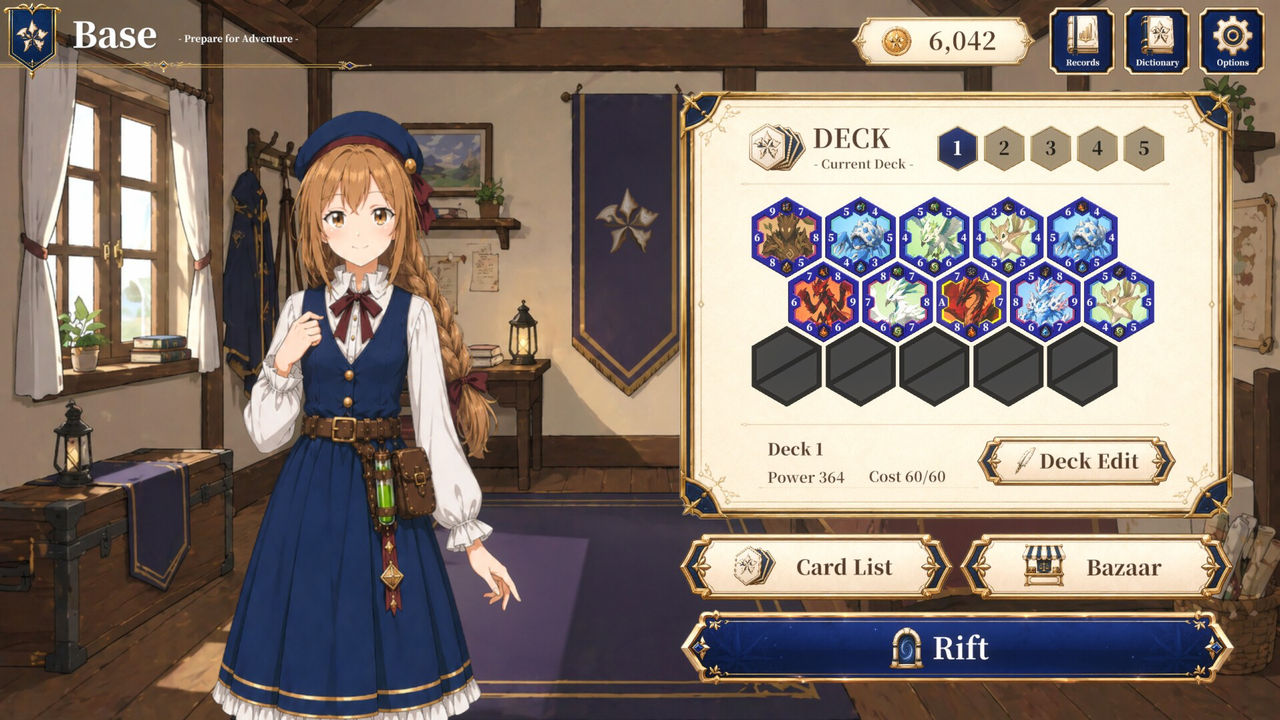
Because those modifiers exist, a battle that looks lost on raw edge values is not always lost, and a run deck that ignored SP for the first few fights will feel weaker than its card list suggests. The specific skill list, SP costs and element table are not published on the store page, so treat those numbers as not documented yet and read them in game.
What a Lost Run Costs
The store page is direct about what grows between runs and quiet about what a defeat takes away. What it does document is the base phase: after a run ends you return to your base, build and refine saved decks, buy and sell cards, fuse cards into stronger ones, and upgrade equipment that provides permanent progression. Equipment upgrades are explicitly permanent, and the stated goal of all of it is to strengthen your collection and improve your setup.
What is not documented is the penalty for losing a specific battle or abandoning a run mid-sequence. The listing does not say whether a lost battle ends the run immediately, whether the run deck is kept, or how much progress is retained, so those details are not documented yet. Until they are published, the safe assumption for a beginner is that the permanent layer (collection, saved decks, equipment) is what you actually bank, and the run deck is the temporary part.
Difficulty and Pacing
Difficulty in Hex Reverse is framed as a ladder rather than a settings menu. The description ends with taking on increasingly difficult Rifts, which is the escalating challenge waiting after each expedition, and nothing on the store listing mentions selectable difficulty levels or adjustable game speed. Pacing is steady rather than reactive: turns alternate, there is no timed-input mechanic in the listing at all, and the listed categories include Save Anytime and Playable without Timed Input, so you can stop and think through every placement without losing tempo.
- Difficulty escalates through Rifts rather than through a difficulty slider, based on the store description.
- Turns alternate, so there is no reaction-speed element and no time pressure.
- Save Anytime and Playable without Timed Input are both listed Steam categories for the game.
- Run length is not quantified anywhere on the store page: the number of battles in a run is not documented yet.
FAQ
What is the core loop of Hex Reverse?
Battles, card picks and a base phase. A run is a series of battles on a 19-space hexagonal field; after winning one you choose a single card from a selection taken from your opponent's deck and it is added directly to your current run deck. When the run ends you return to your base, where you build and refine saved decks, buy and sell cards, fuse cards into stronger ones and upgrade equipment for permanent progression, then take on increasingly difficult Rifts.
How does the flip mechanic work in Hex Reverse?
Each card has six values, one for each side, and only the edges that touch count. When you place a card next to an opponent's card, the values on the touching edges are compared, and if your value is higher the opposing card flips to your side. Nothing happens if your value is lower, so placement decides which of your six values is ever tested.
What does SP do in Hex Reverse?
SP is spent to activate skills. The Steam description says skills can strengthen cards, change their element, weaken opponents, draw additional cards and alter the flow of battle, and that cards are defined by more than just their six values. Special rules and unique field conditions can also change how each battle plays out.
What happens when a run ends in Hex Reverse?
You go back to your base and prepare for the next expedition. The store page documents what carries forward (saved decks, your collection, fused cards and equipment upgrades) but it does not state what is lost when a run ends in defeat, so the exact penalty is not documented yet. What is documented is that equipment upgrades provide permanent progression and that the Rifts you face get increasingly difficult.
Is Hex Reverse real-time or turn-based?
Turn-based. The Steam description says you and your opponent take turns placing cards on the field of 19 hexagonal spaces, and the listing also carries a Playable without Timed Input category, which means nothing in the game is gated behind reaction speed. No time limit mechanic is described on the store page.
More in Mechanics
More mechanics pages in Hex Reverse.
- Hex Reverse Bazaar — Buying, Selling Cards and the Gold LoopGuideUpdated 2026-10-08
- Hex Reverse Cards — Six Values, Edge Flips and Deck GrowthGuideUpdated 2026-10-08
- Hex Reverse Controls — Keyboard, Mouse and Controller SupportGuideUpdated 2026-10-08
- Hex Reverse Features — Hex Battles, Deckbuilding and ProgressionGuideUpdated 2026-10-08
References
- Hex Reverse on Steam
- Hex Reverse Steam Community Hub
- Hex Reverse appdetails (Steam Store API, frozen 2026-10-08)
Facts on this page are compiled from the references above. Items marked "to confirm" are single-source and not yet verified.