
Neighbors: Suburban Warfare · Gameplay · Guide
How to Play Neighbors Suburban Warfare — Beginner Walkthrough
How to play Neighbors Suburban Warfare from the first minute: the prep route, the HUD, tech tiers, base defense and the modes to queue for as a beginner.
By the New Game Wiki team · Updated 2026-10-04
On this page (10)
- The Core Loop in One Match
- Controls, Tools and the Toolbar
- Economy, Tech Tiers and the Shop
- Defending Your House and Attacking Theirs
- Modes to Start With
- How do you play Neighbors: Suburban Warfare as a beginner?
- Is there a practice mode in Neighbors: Suburban Warfare?
- How many players are in a match?
- What does the in-match HUD show?
- What do you spend money on first?
To learn how to play Neighbors Suburban Warfare, treat the first minute as a choreography and the rest of the match as a tug of war over money and structures. You pick a neighbor, gather traps and cash before the barrier lifts, convert crates into team tech upgrades, then break the enemy house before they break yours. The official site describes the loop as deploy traps and barricades to defend your own house, then open your shed to choose tools and get the better of your neighbors.
The Core Loop in One Match
Every match alternates daytime and nighttime. Day is when the yard is open, deliveries land and both teams push. Night activates the guard dogs, which makes the opposing yard lethal and forces ranged play. A practice mode called Practice vs. AI was added at the 1.0 launch, so beginners can learn the layout before queuing.
- Prep before the barrier lifts: collect traps, the free hammer and early money.
- Open with resource crates, which convert into cash plus team tech points.
- Push during the day, defend and upgrade at night.
- Win by destroying the enemy house objective or by knocking out the enemy team, depending on the mode.
The single biggest beginner mistake is attacking a fence. Fences can be hopped, the rooftop ladder cannot be destroyed, and doors cost time to break, so the real targets are windows and objectives.
Controls, Tools and the Toolbar
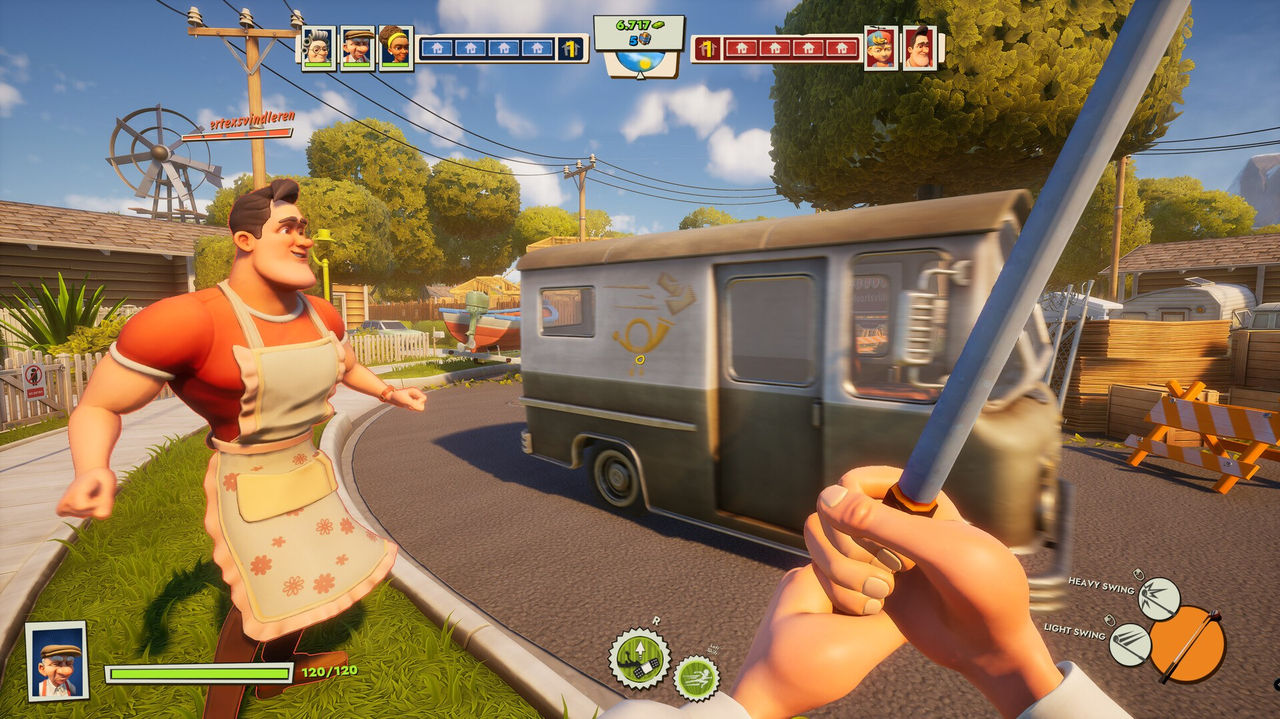
The game supports full controller support and DualSense controller support per the Steam listing, and the Xbox page confirms the console build. Official screenshots show a first-person view with a six-slot toolbar, so what you carry is what you can do.
| HUD element | What it shows |
|---|---|
| Teammate and enemy portraits | One card per player, across the top of the screen |
| Team money counter | Shared cash, in the top centre |
| Structure counters | Four house markers per side, showing what is still standing |
| Health bar | Bottom left, shown as a value like 120/120 |
| Six-slot toolbar | Bottom right, with prompts for aim, fire and heavy or light swing |
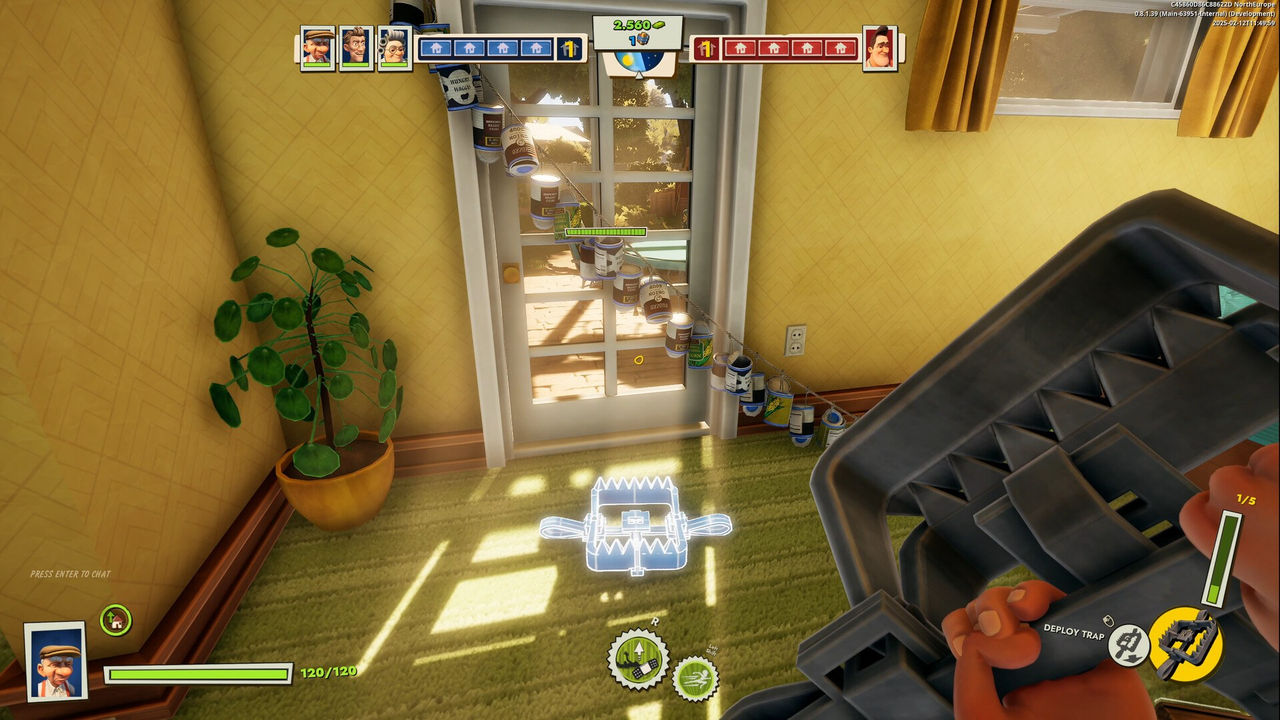
| Deploy trap prompt | Appears when a trap is equipped and placeable |
The tools themselves are ordinary household objects. The Steam description frames it as using whatever you can grab, from frying pans to slingshots, and the wiki's item index lists fifteen, including the crowbar, saw, sledgehammer, golf club, mop, vacuum cleaner and water bucket.
Economy, Tech Tiers and the Shop
Money and tech come from the same actions, which is why efficient players farm both at once. Breaking an outer fence pays money, resource crates pay money plus a tech point, and deliveries drop crates into your own yard.
| Tech counter | Unlock | Priority for a new player |
|---|---|---|
| 4 | Oil wells | Early passive income, up to three team-shared |
| 5 | Saw | Fast structure damage for breaking in |
| 9 | Sledgehammer | Strongest house-breaking tool in the game |
Only order from the shop at night. Deliveries land in the open yard, and during the day an enemy can simply take the crate you paid for, which is a single-source habit worth adopting, to confirm. Oil wells are team-shared, so coordinate before buying so the team reaches three between you.
Defending Your House and Attacking Theirs
Defense comes down to sealing the ground floor. Upgrading a window costs 250 money and locks it shut for good, and community guides treat the ground-floor windows as the first purchase of any defender. Traps cover the rest: bear traps at the back doors and the basement stairs, alarm cans and boards on the roof entry, and a lit fireplace so nobody drops in through the chimney.
On offense, change the order of operations:
- Skip the front door and take a rooftop or window route instead.
- Pull one fireplace log and throw it off the map to reopen the chimney for your team.
- Hit the boiler room early, while it is still lightly defended.
- Steal deliveries and crates instead of chasing fights in the open street.
Cars are a real hazard: standing in the road gets you run over, which veteran players use deliberately as a joke and beginners discover by accident.
Modes to Start With
Neighbors Suburban Warfare shipped with four named modes plus practice. If you are still learning the map, start with Robot Invasion because it is cooperative, then move to Destruction, the mode the game is built around.
| Mode | Type | Good starting point? |
|---|---|---|
| Destruction | PvP objective | Yes, once you know the houses |
| Brawl | PvP team fight | Once you know one neighbor's kit |
| Prop Hunt | PvP hide and seek | Anytime, low stakes |
| Robot Invasion | PvE defense | Best first mode for map learning |
| Practice vs. AI | Single player | Best for learning controls |
Once the opening loop feels automatic, move on to the guide for economy routing, the game modes page for mode detail, and the tier list to choose a main.
FAQ
How do you play Neighbors: Suburban Warfare as a beginner?
Pick a teammate role, run the prep route for traps and money, then fight for resource crates so your team can climb the tech tiers. The score win condition is destroying the enemy house objective before they destroy yours, in Destruction, or knocking out the enemy team in the pure-fight modes.
Is there a practice mode in Neighbors: Suburban Warfare?
Yes. The 1.0 launch post on 29 September 2026 says a practice mode was added, listed as Practice vs. AI, and the Xbox store page separately lists single-player support, so a new player can learn the map without live opponents.
How many players are in a match?
The Xbox store page lists online multiplayer for 2 to 10 players, and the PlayStation store page says the PS5 version supports up to 10 online players with PS Plus. The game fills uneven lobbies with a Hot Join feature rather than bots.
What does the in-match HUD show?
Official screenshots show teammate and enemy portraits across the top, a team money counter and four structure counters in the middle, a health bar bottom-left, and a six-slot toolbar bottom-right with prompts for aiming, firing, heavy and light swings and deploy trap.
What do you spend money on first?
Community guides recommend ground-floor window upgrades at 250 money each, traps, and the shared tech upgrades, with oil wells recommended as an early-economy purchase. Orders should be placed at night, when guard dogs stop enemies from stealing the delivery.
More in Gameplay
More gameplay pages in Neighbors: Suburban Warfare.
- Neighbors Suburban Warfare Game Modes — Destruction to Robot InvasionGuideUpdated 2026-10-04
- Neighbors Suburban Warfare Mods — Mod Support Status and AlternativesGuideUpdated 2026-10-04
References
- NEIGHBORS: Suburban Warfare — Official Site
- Get NEIGHBORS: Suburban Warfare — Xbox Store
- Neighbors: Suburban Warfare on Steam
- Neighbors: Suburban Warfare — Steam Community Hub
- Neighbors Suburban Warfare - FULL Game Guide, Optimal Strategies, Best Building Placement, Tier List — YouTube
Facts on this page are compiled from the references above. Items marked "to confirm" are single-source and not yet verified.